> ## Documentation Index
> Fetch the complete documentation index at: https://ngquct-feat-saved-query-version-control.mintlify.site/llms.txt
> Use this file to discover all available pages before exploring further.
# MySQL
> Connect to MySQL 5.7 and later with the bundled MariaDB Connector/C driver
MySQL 8 accounts on `caching_sha2_password` connect on the first try, with no auth plugin to switch over. The same bundled driver covers 5.7 and later, plus [MariaDB](/databases/mariadb), [TiDB](/databases/tidb), [Databend](/databases/databend), and [OceanBase](/databases/oceanbase).
## Quick setup
Click **New Connection…** on the welcome window and pick **MySQL**
Fill in host, port, and credentials, click **Test Connection**, then **Save & Connect**
## Connection settings
| Field | Default | Notes |
| ------------ | ----------- | -------------------------------------------------- |
| **Host** | `localhost` | TCP only, never a Unix socket |
| **Port** | `3306` | |
| **Username** | empty | An empty field connects as your macOS login name |
| **Password** | empty | Stored in the macOS Keychain |
| **Database** | empty | Optional. Leave it empty and open one with `Cmd+K` |
Every connection sets its session character set to `utf8mb4` once it logs in, over any `init_connect` the server runs, so emoji and non-Latin text round-trip untouched. A connect attempt gives up after 10 seconds.
## Connection URL
```text theme={null}
mysql://user:password@host:3306/database
```
Opening a URL connects directly. See [Connection URL Reference](/connections/urls).
## Common setups
| Where | Settings |
| ----------------- | ---------------------------------------------------------------------------------------------------------------------- |
| Homebrew | `localhost:3306` |
| Docker | `localhost` with the mapped port, password from `MYSQL_ROOT_PASSWORD` |
| MAMP Pro | `localhost:8889`, user and password `root` |
| AWS RDS / Aurora | Endpoint hostname, password or [AWS IAM](/connections/aws-iam), which signs a fresh 15-minute token on each connect |
| Google Cloud SQL | **Connect via > Cloud SQL Auth Proxy** and the instance name. See [Cloud SQL Auth Proxy](/connections/cloud-sql-proxy) |
| Remote production | [SSH tunnel](/connections/ssh-tunneling) |
## Users & Roles
**Database > Users & Roles** manages users, roles, and privileges. Changes are staged and shown as SQL before they run. See [Users & Roles](/features/users-roles).
## Query plans
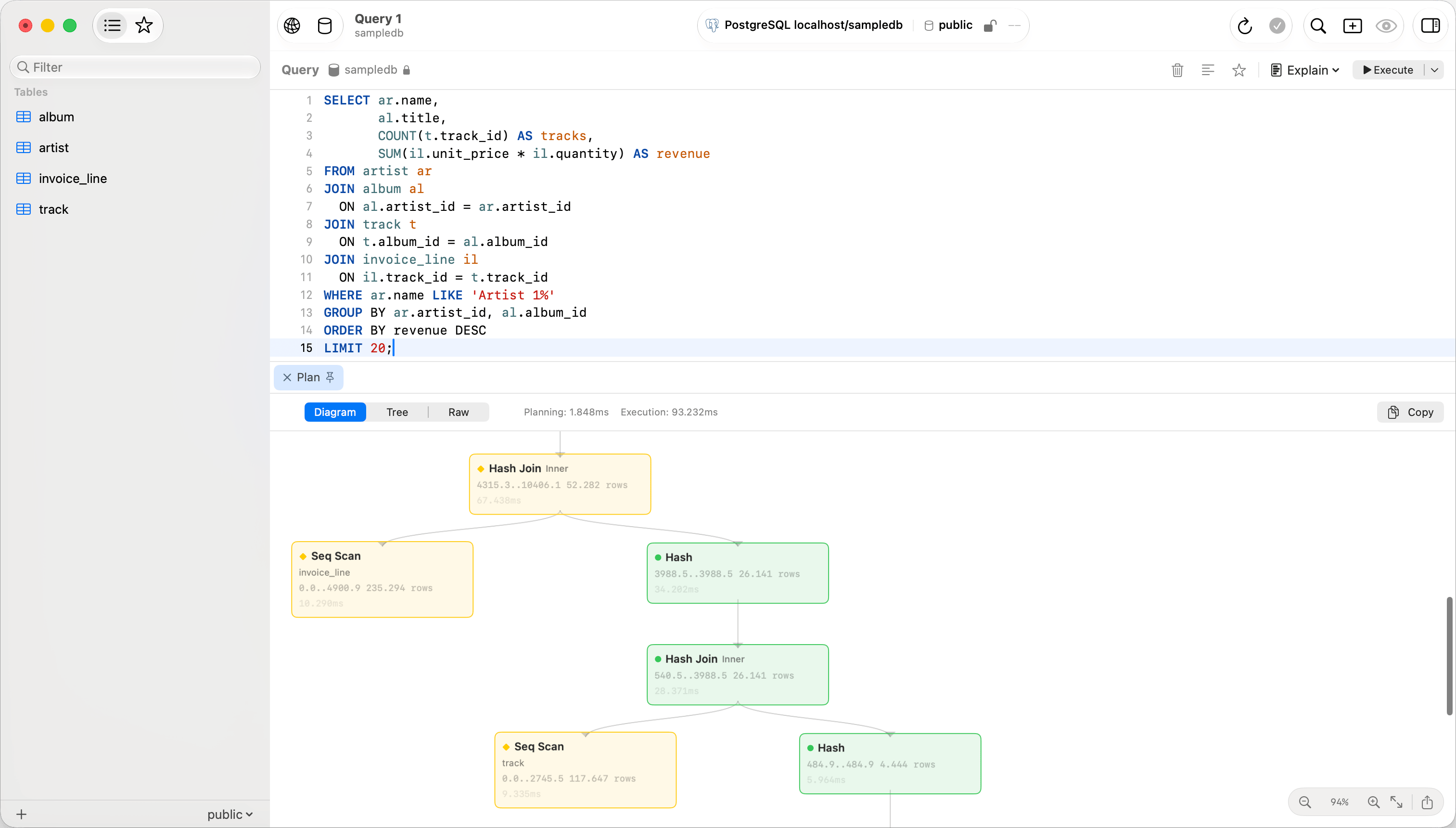
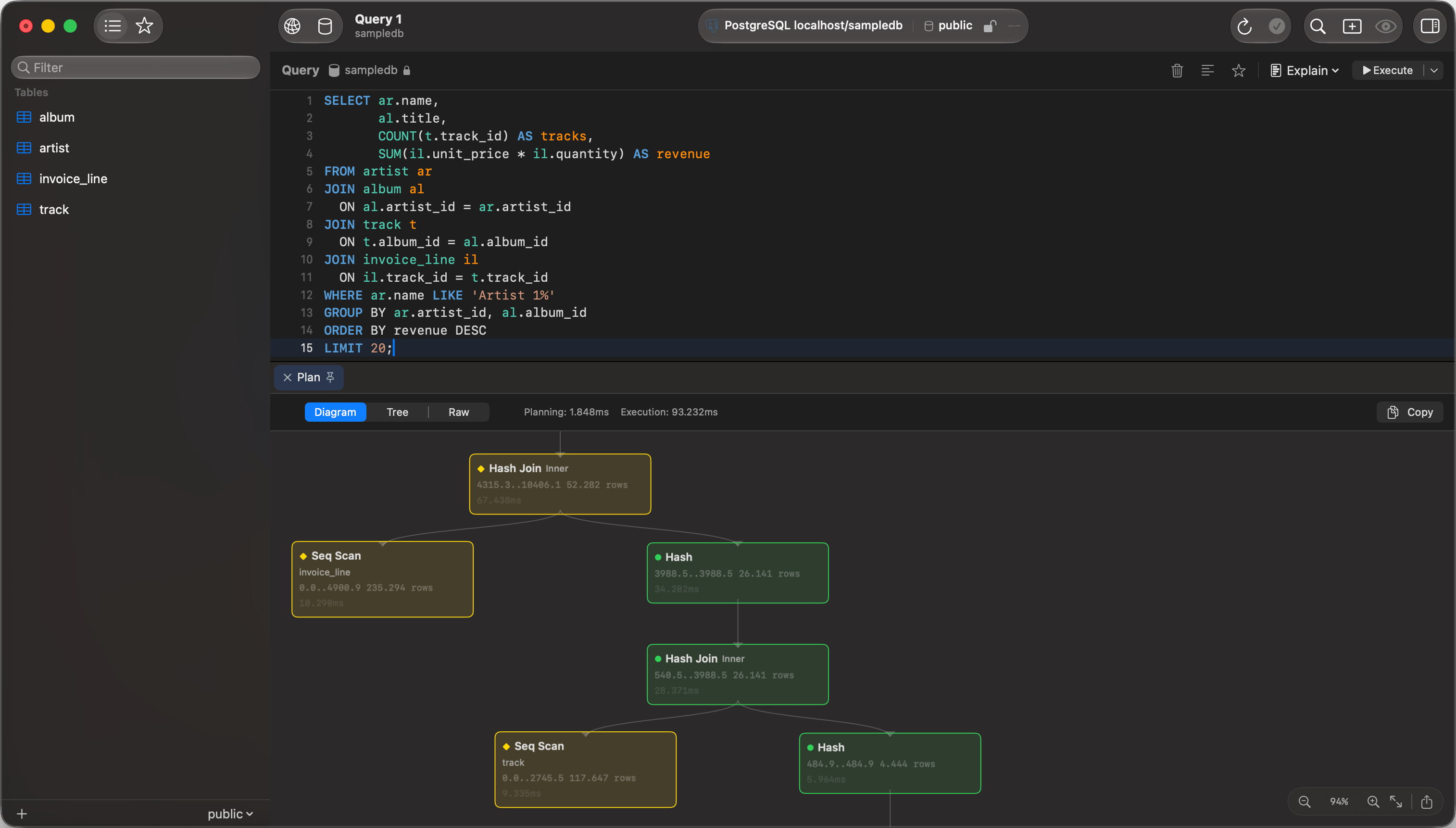
`EXPLAIN FORMAT=JSON`, `EXPLAIN FORMAT=TREE`, and `EXPLAIN ANALYZE` render as a plan diagram or tree; plain multi-column `EXPLAIN` stays in the results grid. See [EXPLAIN Visualization](/features/explain-visualization).
 ## Browsing
The sidebar lists one database's tables, or every accessible database with **View > Sidebar as Tree**. Switch databases with `Cmd+K`. A connection with an empty **Database** field opens on **No Database Selected** in the flat list: click **Open Database…** to pick one. A tab keeps the database it was opened on; MySQL switches database in place, so that tab runs on the same connection rather than a second one.
Table and column comments show in the UI: dimmed after a table's name in the sidebar, and in the grid header tooltip. Turn that off under **View Options**, the button beside the sidebar’s filter field.
A partitioned table shows how many partitions it holds and lists them under it. A `RANGE` partition is labelled `VALUES LESS THAN (2024)` and a `LIST` one `VALUES IN (1,2,3)`; `HASH` and `KEY` partitions state no bound, so their rows carry the position instead. Subpartitions nest under the partition they subdivide.
A MySQL partition belongs to its table rather than standing as one, so its row offers **Copy Name**, **Copy Bound** and **Copy Table Name** and nothing that writes. Query one with `SELECT * FROM orders PARTITION (p2024)` in the editor.
## Releasing an idle connection
A connection holds a server thread and one slot against `max_connections` for as long as it is open, and MySQL's `wait_timeout` rarely reclaims it because the connection check counts as activity on the server. **Release the Server Connection After**, in **Options**, hands the connection back after that many minutes of no queries and takes a new one on the next query. `0`, the default, keeps it.
To stop the check itself, set **Check connections** to **Only when I use the connection** in Settings > General. That is the connection-wide setting; this one is per connection and closes the connection rather than quietening it.
Reconnecting costs a TCP connect, the TLS handshake and authentication: measured at 2ms against a server on the same machine and 800ms to 1.9s across the internet. That cost lands on the first query after an idle period, so leave this at `0` for a remote server unless the slot matters more than the wait.
A release is refused, with the reason, while the session holds anything a reconnect would destroy: an open transaction, a temporary table, a prepared statement, a `GET_LOCK`, `LOCK TABLES`, `FLUSH TABLES WITH READ LOCK`, an open `HANDLER`, a user variable, a changed session setting, a database selected with `USE`, or a stored routine call, whose body is opaque. The statements a dump runs inside `/*!40101 ... */` count, since the server executes them. The transaction comes from the server itself, so one opened by `SET autocommit = 0` or by an `XA START` counts as well.
## When the server drops the connection
A read that fails because the server closed the connection is run once more on a new one, and only from a session holding nothing: the same list as above. Every other statement reports the error, because the second session answers from different state. Measured on MySQL 8.4.11, replaying regardless: `SELECT @total` came back `NULL` where it had come back 42, and `SELECT DATABASE()` came back as the connection's own database rather than the one `USE` had selected, neither of them raising anything. `LAST_INSERT_ID()`, `ROW_COUNT()`, `FOUND_ROWS()` and `CONNECTION_ID()` are never replayed either, whatever the session holds: their answer belongs to the connection that is gone.
A connection with startup commands that run `SET` is holding a changed session setting from the moment it opens, so it reports the error rather than retrying. **Database > Reconnect** takes a new connection and puts back the database and the startup commands.
Waiting has its own limit, and reaching it is a different case. The socket gives the server the [query timeout](/customization/general-settings#query-timeout) plus 30 seconds, and a statement that outlasts that is never sent again: the first copy is almost certainly still running there. It is stopped with `KILL QUERY` from a second connection, and the error comes back after that.
## Garbled non-Latin text
A comment or value that reads `メール` where `メール` belongs was written by a client that sent UTF-8 while telling the server it was sending Latin 1. A `mysql` command-line client without a UTF-8 locale does that, and so does a MySQL 5.7 container loading its `docker-entrypoint-initdb.d` scripts, and so does any client on a server whose `init_connect` runs `SET NAMES latin1`. The server stored the garbled form, so every UTF-8 client shows the same thing.
To work with such a database the way that client did, set **Encoding** to **UTF-8 via Latin 1** in **Options** and reconnect. Text written through Latin 1 then reads correctly, text stored correctly still reads correctly, and whatever you save is stored the way the old client stored it, so the application that wrote the data keeps reading it.
With **UTF-8 via Latin 1**, a correctly stored value you edit is saved in the garbled form, and a table or column whose non-Latin name was stored correctly cannot be opened. Use it on a database written through Latin 1, never on one where applications write UTF-8.
An SQL export taken with **UTF-8 via Latin 1** holds the text as it reads, in UTF-8. Restoring it gives a database with the text fixed, which the old client then reads as `?`. Restore it where you are moving off that client, not as a backup of the database it still writes to.
To fix the stored text instead, convert it in place. The `WHERE` clause skips values that were stored correctly:
```sql theme={null}
UPDATE orders
SET note = CONVERT(CAST(CONVERT(note USING latin1) AS BINARY) USING utf8mb4)
WHERE note = CONVERT(CONVERT(note USING latin1) USING utf8mb4)
AND CONVERT(CAST(CONVERT(note USING latin1) AS BINARY) USING utf8mb4) IS NOT NULL;
```
Table comments take one `ALTER TABLE` each. This query writes them for the current database; run the statements it returns:
```sql theme={null}
SELECT CONCAT('ALTER TABLE `', TABLE_NAME, '` COMMENT = ',
QUOTE(CONVERT(CAST(CONVERT(TABLE_COMMENT USING latin1) AS BINARY) USING utf8mb4)), ';')
FROM information_schema.TABLES
WHERE TABLE_SCHEMA = DATABASE() AND TABLE_COMMENT <> ''
AND TABLE_COMMENT = CONVERT(CONVERT(TABLE_COMMENT USING latin1) USING utf8mb4)
AND CONVERT(CAST(CONVERT(TABLE_COMMENT USING latin1) AS BINARY) USING utf8mb4) IS NOT NULL;
```
A column comment is part of the column's definition. Copy it from the **Structure** tab while **UTF-8 via Latin 1** is on, then switch back to **UTF-8**, reconnect, and paste it into the same column.
## Behind a protocol proxy
DBLE, MyCat and ShardingSphere-Proxy answer `information_schema` from their own configuration rather than from the database in front of you. A logical schema whose name is not a physical database reads back empty there, or with `ERROR 1064`.
Point the connection at the proxy and browse as usual. Tables, columns, indexes and foreign keys come from `SHOW` statements when the catalog says nothing, and nothing changes on a direct server. The sidebar, the **Structure** tab, schema comparison and the ER diagram all fill in from that. Each whole-schema read costs one statement per table on that path, every time: a sidebar refresh, an ER diagram and a schema compare each pay it again.
Two fields are unavailable on that path, because only `information_schema` carries them:
* A generated column's expression. The column still shows as generated.
* A foreign key's `ON DELETE` and `ON UPDATE` where the server prints no clause for them. MySQL 8.0.11 and 8.0.12 print nothing for `RESTRICT`, which reads back as `NO ACTION`. 8.0.13 and later print it.
## SSL/TLS
New connections default to **Preferred**: TLS first, dropping to plain text only after an SSL handshake error. Pick **Verify CA** with the provider's certificate for strict validation. See [SSL/TLS](/connections/ssl).
## Limitations
* No Unix socket connections. Give the connection a host and a port, and leave networking on in the server.
* `LOAD DATA LOCAL INFILE` is refused by the driver. Load the file with **File > Import > Import Data…** instead.
## Troubleshooting
### Connection refused
Nothing answered on that host and port. Check the server is running (`brew services start mysql`), the port is right, and `skip-networking` is off.
### Access denied for user '…'@'…' (using password: YES)
The password is wrong, or no account covers the host you connect from. Sign in with an account that can read the `mysql` schema and run `SHOW GRANTS FOR 'name'@'host';` with the real user name and host. Without that access, the statement fails with `SELECT command denied`.
### Access denied for user '…'@'…' to database '…'
The account can see the database in the list but holds no privilege in it, so the server refuses to open it. An account whose only privilege there covers routines, such as `EXECUTE`, opens the database and lists no tables. Check what the server matched and granted:
```sql theme={null}
SELECT CURRENT_USER();
SHOW GRANTS;
```
`CURRENT_USER()` can name a different account from the one you typed, such as `'name'@'%'` when `'name'@'localhost'` holds the grants. A role listed in `SHOW GRANTS` grants nothing until it is active, and a new connection starts with its default roles only: ask for `SET DEFAULT ROLE ALL TO 'name'@'host';`. Otherwise ask for `SELECT` on the database.
### Authentication plugin errors
`caching_sha2_password` needs no configuration. For any other plugin, read the account's plugin with `SELECT user, plugin FROM mysql.user;`.
## Browsing
The sidebar lists one database's tables, or every accessible database with **View > Sidebar as Tree**. Switch databases with `Cmd+K`. A connection with an empty **Database** field opens on **No Database Selected** in the flat list: click **Open Database…** to pick one. A tab keeps the database it was opened on; MySQL switches database in place, so that tab runs on the same connection rather than a second one.
Table and column comments show in the UI: dimmed after a table's name in the sidebar, and in the grid header tooltip. Turn that off under **View Options**, the button beside the sidebar’s filter field.
A partitioned table shows how many partitions it holds and lists them under it. A `RANGE` partition is labelled `VALUES LESS THAN (2024)` and a `LIST` one `VALUES IN (1,2,3)`; `HASH` and `KEY` partitions state no bound, so their rows carry the position instead. Subpartitions nest under the partition they subdivide.
A MySQL partition belongs to its table rather than standing as one, so its row offers **Copy Name**, **Copy Bound** and **Copy Table Name** and nothing that writes. Query one with `SELECT * FROM orders PARTITION (p2024)` in the editor.
## Releasing an idle connection
A connection holds a server thread and one slot against `max_connections` for as long as it is open, and MySQL's `wait_timeout` rarely reclaims it because the connection check counts as activity on the server. **Release the Server Connection After**, in **Options**, hands the connection back after that many minutes of no queries and takes a new one on the next query. `0`, the default, keeps it.
To stop the check itself, set **Check connections** to **Only when I use the connection** in Settings > General. That is the connection-wide setting; this one is per connection and closes the connection rather than quietening it.
Reconnecting costs a TCP connect, the TLS handshake and authentication: measured at 2ms against a server on the same machine and 800ms to 1.9s across the internet. That cost lands on the first query after an idle period, so leave this at `0` for a remote server unless the slot matters more than the wait.
A release is refused, with the reason, while the session holds anything a reconnect would destroy: an open transaction, a temporary table, a prepared statement, a `GET_LOCK`, `LOCK TABLES`, `FLUSH TABLES WITH READ LOCK`, an open `HANDLER`, a user variable, a changed session setting, a database selected with `USE`, or a stored routine call, whose body is opaque. The statements a dump runs inside `/*!40101 ... */` count, since the server executes them. The transaction comes from the server itself, so one opened by `SET autocommit = 0` or by an `XA START` counts as well.
## When the server drops the connection
A read that fails because the server closed the connection is run once more on a new one, and only from a session holding nothing: the same list as above. Every other statement reports the error, because the second session answers from different state. Measured on MySQL 8.4.11, replaying regardless: `SELECT @total` came back `NULL` where it had come back 42, and `SELECT DATABASE()` came back as the connection's own database rather than the one `USE` had selected, neither of them raising anything. `LAST_INSERT_ID()`, `ROW_COUNT()`, `FOUND_ROWS()` and `CONNECTION_ID()` are never replayed either, whatever the session holds: their answer belongs to the connection that is gone.
A connection with startup commands that run `SET` is holding a changed session setting from the moment it opens, so it reports the error rather than retrying. **Database > Reconnect** takes a new connection and puts back the database and the startup commands.
Waiting has its own limit, and reaching it is a different case. The socket gives the server the [query timeout](/customization/general-settings#query-timeout) plus 30 seconds, and a statement that outlasts that is never sent again: the first copy is almost certainly still running there. It is stopped with `KILL QUERY` from a second connection, and the error comes back after that.
## Garbled non-Latin text
A comment or value that reads `メール` where `メール` belongs was written by a client that sent UTF-8 while telling the server it was sending Latin 1. A `mysql` command-line client without a UTF-8 locale does that, and so does a MySQL 5.7 container loading its `docker-entrypoint-initdb.d` scripts, and so does any client on a server whose `init_connect` runs `SET NAMES latin1`. The server stored the garbled form, so every UTF-8 client shows the same thing.
To work with such a database the way that client did, set **Encoding** to **UTF-8 via Latin 1** in **Options** and reconnect. Text written through Latin 1 then reads correctly, text stored correctly still reads correctly, and whatever you save is stored the way the old client stored it, so the application that wrote the data keeps reading it.
With **UTF-8 via Latin 1**, a correctly stored value you edit is saved in the garbled form, and a table or column whose non-Latin name was stored correctly cannot be opened. Use it on a database written through Latin 1, never on one where applications write UTF-8.
An SQL export taken with **UTF-8 via Latin 1** holds the text as it reads, in UTF-8. Restoring it gives a database with the text fixed, which the old client then reads as `?`. Restore it where you are moving off that client, not as a backup of the database it still writes to.
To fix the stored text instead, convert it in place. The `WHERE` clause skips values that were stored correctly:
```sql theme={null}
UPDATE orders
SET note = CONVERT(CAST(CONVERT(note USING latin1) AS BINARY) USING utf8mb4)
WHERE note = CONVERT(CONVERT(note USING latin1) USING utf8mb4)
AND CONVERT(CAST(CONVERT(note USING latin1) AS BINARY) USING utf8mb4) IS NOT NULL;
```
Table comments take one `ALTER TABLE` each. This query writes them for the current database; run the statements it returns:
```sql theme={null}
SELECT CONCAT('ALTER TABLE `', TABLE_NAME, '` COMMENT = ',
QUOTE(CONVERT(CAST(CONVERT(TABLE_COMMENT USING latin1) AS BINARY) USING utf8mb4)), ';')
FROM information_schema.TABLES
WHERE TABLE_SCHEMA = DATABASE() AND TABLE_COMMENT <> ''
AND TABLE_COMMENT = CONVERT(CONVERT(TABLE_COMMENT USING latin1) USING utf8mb4)
AND CONVERT(CAST(CONVERT(TABLE_COMMENT USING latin1) AS BINARY) USING utf8mb4) IS NOT NULL;
```
A column comment is part of the column's definition. Copy it from the **Structure** tab while **UTF-8 via Latin 1** is on, then switch back to **UTF-8**, reconnect, and paste it into the same column.
## Behind a protocol proxy
DBLE, MyCat and ShardingSphere-Proxy answer `information_schema` from their own configuration rather than from the database in front of you. A logical schema whose name is not a physical database reads back empty there, or with `ERROR 1064`.
Point the connection at the proxy and browse as usual. Tables, columns, indexes and foreign keys come from `SHOW` statements when the catalog says nothing, and nothing changes on a direct server. The sidebar, the **Structure** tab, schema comparison and the ER diagram all fill in from that. Each whole-schema read costs one statement per table on that path, every time: a sidebar refresh, an ER diagram and a schema compare each pay it again.
Two fields are unavailable on that path, because only `information_schema` carries them:
* A generated column's expression. The column still shows as generated.
* A foreign key's `ON DELETE` and `ON UPDATE` where the server prints no clause for them. MySQL 8.0.11 and 8.0.12 print nothing for `RESTRICT`, which reads back as `NO ACTION`. 8.0.13 and later print it.
## SSL/TLS
New connections default to **Preferred**: TLS first, dropping to plain text only after an SSL handshake error. Pick **Verify CA** with the provider's certificate for strict validation. See [SSL/TLS](/connections/ssl).
## Limitations
* No Unix socket connections. Give the connection a host and a port, and leave networking on in the server.
* `LOAD DATA LOCAL INFILE` is refused by the driver. Load the file with **File > Import > Import Data…** instead.
## Troubleshooting
### Connection refused
Nothing answered on that host and port. Check the server is running (`brew services start mysql`), the port is right, and `skip-networking` is off.
### Access denied for user '…'@'…' (using password: YES)
The password is wrong, or no account covers the host you connect from. Sign in with an account that can read the `mysql` schema and run `SHOW GRANTS FOR 'name'@'host';` with the real user name and host. Without that access, the statement fails with `SELECT command denied`.
### Access denied for user '…'@'…' to database '…'
The account can see the database in the list but holds no privilege in it, so the server refuses to open it. An account whose only privilege there covers routines, such as `EXECUTE`, opens the database and lists no tables. Check what the server matched and granted:
```sql theme={null}
SELECT CURRENT_USER();
SHOW GRANTS;
```
`CURRENT_USER()` can name a different account from the one you typed, such as `'name'@'%'` when `'name'@'localhost'` holds the grants. A role listed in `SHOW GRANTS` grants nothing until it is active, and a new connection starts with its default roles only: ask for `SET DEFAULT ROLE ALL TO 'name'@'host';`. Otherwise ask for `SELECT` on the database.
### Authentication plugin errors
`caching_sha2_password` needs no configuration. For any other plugin, read the account's plugin with `SELECT user, plugin FROM mysql.user;`.